
FROM THE WORKSHOP
Small details.
Meaningful differences.
The decisions behind AddvancedFocus, what you can try today, and what we’re learning as we build.
DESIGN NOTE / 01
The task is still there.
But where were you?
A task title tells you what needs doing. It doesn’t always tell you how to get back into it.
In the AddvancedFocus website preview, pausing a session gives you a place to leave a short return note. “Next: write one rough sentence” is enough. When you resume, the note stays with the action.
The decision
Keep the note beside the task and timer. Make it optional. Let someone resume even if they had no time to write anything before stepping away.
What we still need to learn
Does this reduce the effort of returning in everyday use? When does a prompt help, and when does it get in the way? Those are questions for future participant feedback—not outcomes we’ve established.
The website preview clears notes when you leave. Persistent context is part of the full product’s development.
Try pausing and returningWEBSITE PREVIEW
A smaller start.
A way back.
The AddvancedFocus website preview makes a core product idea usable today: turn an avoided task into a manageable action, then keep your place when life interrupts.
Read the walkthrough
- Choose a first action: open an overdue email.
- Start a two-minute session with that one action in view.
- Pause and leave a return note: “Next: write one rough sentence.”
- Resume with the note still visible.
What you can try
- Choose a work, home, or personal-life example—or bring your own task and choose its first small action.
- Make the proposed action smaller or adjust it to your energy.
- Start a focus session, pause, and keep a return note.
- Complete a step and undo that choice when you need to.
The examples and own-task planner run in your browser without AI or an account. Your task, first step, and notes stay only in the open page; refreshing, leaving, or starting fresh clears them.
What changed on Biro.dev
The company website now centers on AddvancedFocus, with a clearer company story, simpler navigation, and layouts refined for phones and desktops. The published update passed 298 browser checks and Lighthouse checks.
Read the published change →This testing record applies to the website update published October 12, 2026. Automated checks do not replace hands-on assistive-technology testing; see the current accessibility record.
FROM DEVELOPMENT
One action.
Room to pause.
An earlier FocusFlow prototype explores the same everyday challenge: starting a task and keeping a way back.
This development screen shows a small physical action, a timer, and controls to pause or save your place. The school-form task is example data.
This is a separate development prototype, not the final AddvancedFocus interface or an announcement of app availability.
Try the current website preview →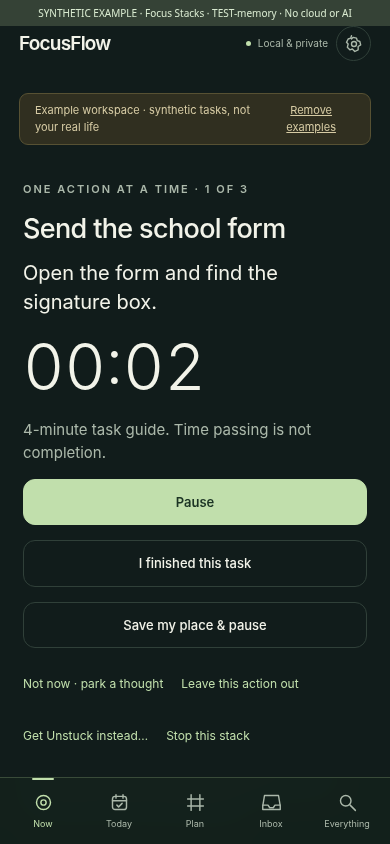
WHAT COMES NEXT
A working preview.
A product still taking shape.
Available now The interactive website preview, a browser-only planner for your own task, and optional confirmed product updates.
Being developed AI-assisted planning, routines, persistent context, and household coordination for the full AddvancedFocus application.
Not announced A public app release, supported platforms, pricing, or a beta date. This website preview is not a downloadable application.
Want to help shape the next step? When you sign up, you can optionally choose feedback questions or early-build testing invitations. Every invitation is yours to accept or decline, and no call is required.